
Compare flights
| Platform | Status | Where |
|---|---|---|
| iOS | done | vulture-ios/Packages/FlightScreens/Sources/FlightScreens/Comparevulture-ios/Packages/FlightScreens/Sources/FlightScreens/Hosting/Comparevulture-ios/Packages/Flights/Sources/Flights/ModelsLeader analysis in LeechingAnalysis*.swift, LeaderAnalysis.swift |
| Android | done | vulture-android/feature/comparevulture-android/domain/compareFull-screen dialog on every width (D8). FIXED(B20). |
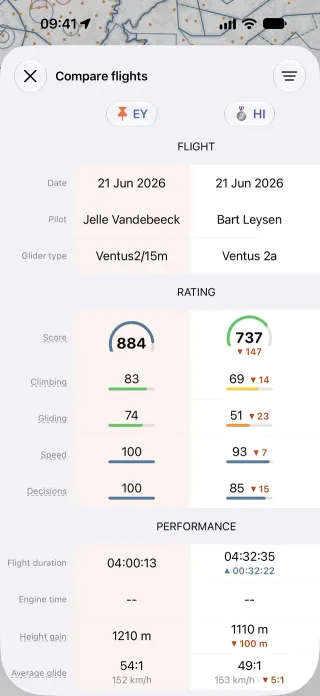
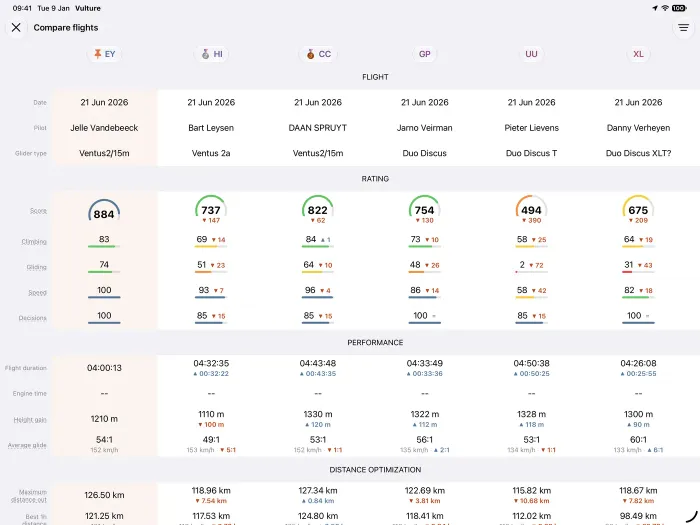
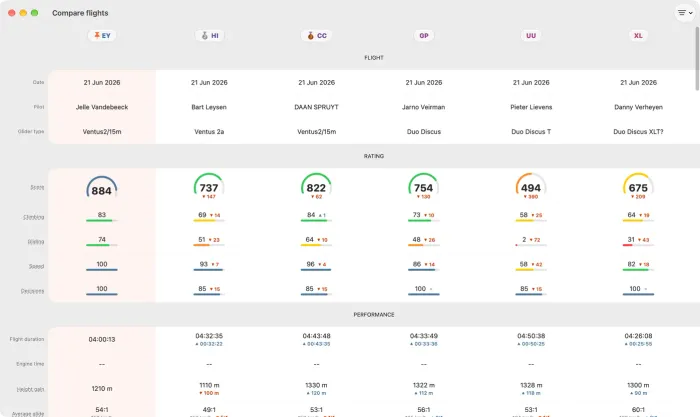
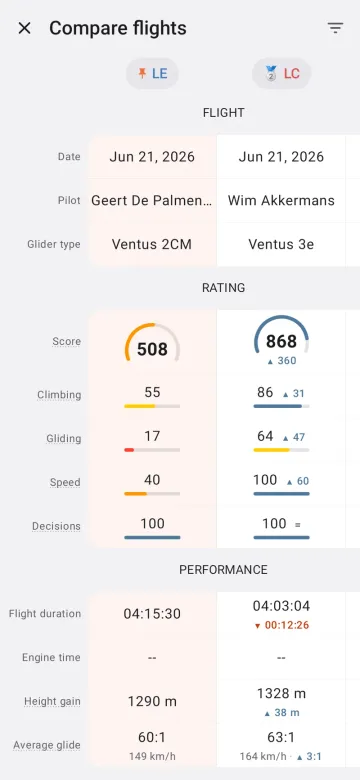
Behaviour
Section titled “Behaviour”- A grid of figures for each flight on the map (speed, distance, climb, glide and so on) with the differences, ratings and ranks between them.
- Proximity between flights: how long they flew together.
- Leader and follower: between two flights, who led and who followed, from the bearing geometry per second and the lag in circling, with the thermals they shared paired up.
- Needs Vulture Pro (
severalFlights).
Platform differences
Section titled “Platform differences”- Android shows Compare as a full-screen dialog on every window width (decisions §8 D8); iOS uses a sheet or a separate window on iPad and Mac.
- Shared tasks are compared by value on Android (B20).
- The leader analysis is part of the shared domain algorithms that the golden data checks; whether Android shows every iOS leader row is not verified here.