
Home base
| Platform | Status | Where |
|---|---|---|
| iOS | done | vulture-ios/Packages/Persistence/Sources/Persistence/HomebaseManager.swiftvulture-ios/Packages/Preferences/Sources/Preferences/SharedDefaults.swiftvulture-ios/Packages/AirportScreens/Sources/AirportScreens/Homebase |
| Android | done | vulture-android/feature/settings/src/main/kotlin/be/fousa/vulture/feature/settings/homebasevulture-android/domain/airportsvulture-android/data/prefsSet and synced; the flight and task maps start on it. |
Behaviour
Section titled “Behaviour”- Set a home base; the maps centre on it when there is nothing else to show.
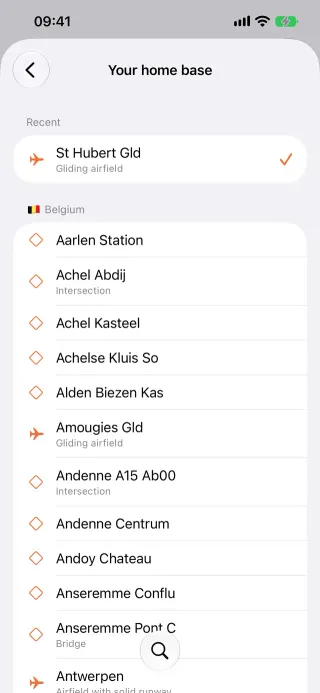
- It is picked from the bundled airports table (iOS and Android since unreleased; on iOS it was the waypoint files before): the recent home bases, then 50 airfields, or the airfields whose code or name matches the search, regardless of case and accents, the exact code first, at most 100. The list is sorted by distance from the device’s current location, or alphabetically when the location is unknown (iOS and Android since unreleased: Home base sort). An airfield is kept under the name “name (code)”, such as “Saint Hubert (EBSH)”; home bases picked from waypoint files before keep working and stay among the recents.
- Recent home bases are kept for quick switching and sync between devices.
- The home base is shared with the widgets through the app group.
Platform differences
Section titled “Platform differences”- Android sets the home base in Settings › General and syncs it (the
homeBasesetting and thehomebasesrecords). Its flight and task maps start on it at zoom 9, as iOS’s (since unreleased, Maps start at the home base); an open map does not move when the home base changes on another device. Nothing else on Android reads it: there are no widgets, METAR or in-flight mode, and the task map has no recents menu. See Android settings parity. - iOS’s in-flight go-to target uses the same picker and still picks from the waypoint files.
- iOS asks for location while in use once, the first time the picker opens, if it was never asked; the system does not ask again after a refusal.
- Android asks for approximate location (
ACCESS_COARSE_LOCATION) once, the first time the picker opens, and remembers that it asked; a refusal leaves the list alphabetical until access is granted in the system settings.